
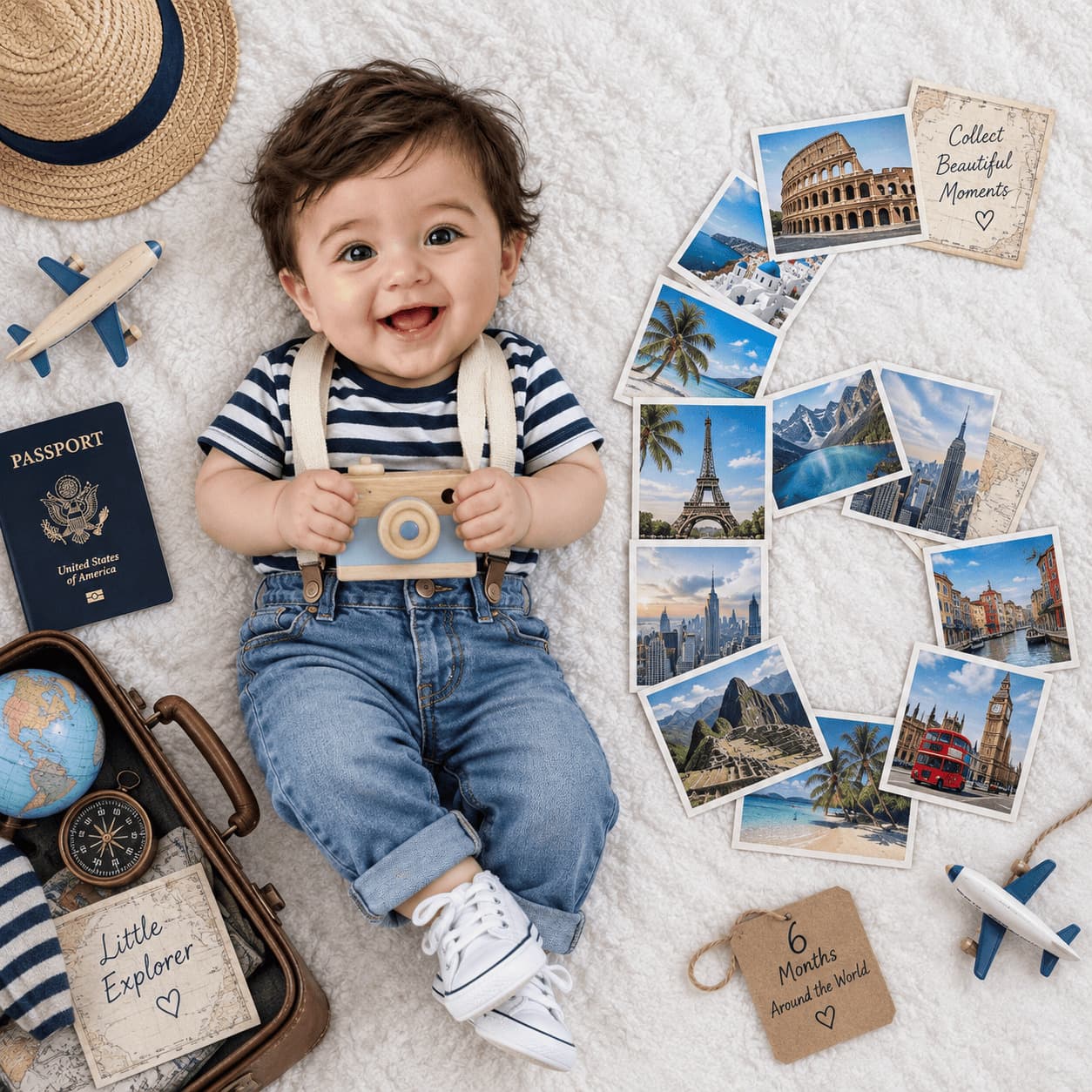
Travel photo milestone flat lay
An overhead flat lay of your baby in stripes and suspenders with a toy camera, beside a month number built from printed holiday photographs.
- Needs your baby’s photo
- flat lay
- overhead
- travel
- props
- number
- photos
- suitcase
Twelve months, one keepsake
Those postcards are someone else's trips. The First Year collage does the same wall in twelve photographs of your own.

Free to download · iPhone and iPad · Photos never leave your device
The prompt
Create an extremely realistic professional baby milestone photograph using the uploaded baby photograph as the ONLY image input.

IMPORTANT:
The uploaded baby photograph is ONLY the identity reference for the baby.

Use the uploaded baby to accurately reproduce the baby's real identity, face, skin tone, hair, facial proportions and natural appearance.

Do NOT use the uploaded baby photograph as the scene, background, clothing, or prop reference.

Recreate the complete photographic setup described below.

MILESTONE NUMBER: [NUMBER]

[NUMBER] represents the baby's [NUMBER]-month milestone.

==================================================
CORE CONCEPT
==================================================

Create a realistic TRAVEL-THEMED baby milestone photograph.

The entire scene is a TOP-DOWN FLAT-LAY photograph.

A real baby is lying on a large soft white textured surface.

The baby is positioned on the LEFT side of the composition.

A large milestone number is created on the RIGHT side using a carefully arranged vertical sequence of REAL TRAVEL PHOTOGRAPHS / POSTCARDS.

A small travel suitcase filled with travel-related items is positioned in the LOWER-LEFT corner near the baby's feet.

The entire setup should look like a real travel-themed baby photoshoot physically arranged on a white bed or white photography mat and photographed from directly above.

==================================================
CAMERA AND VIEWPOINT
==================================================

Use a square 1:1 photograph.

Camera positioned directly ABOVE the entire setup.

Approximately a 90-degree overhead viewpoint.

Everything is photographed from directly above.

There must be no visible wall, floor, room, furniture or horizon.

The white surface fills the entire frame.

Use a realistic modern camera or smartphone photographic perspective.

No dramatic perspective.

No wide-angle distortion.

No cinematic camera angle.

The result should look like an authentic overhead family photograph.

==================================================
BABY POSITION AND COMPOSITION
==================================================

Place the baby on the LEFT side of the photograph.

The baby's head is positioned toward the upper-left area.

The baby's body extends downward toward the lower-left / center-left.

The baby is lying naturally on their back on the white surface.

The baby's entire body should be visible from head to feet.

The baby should look naturally relaxed, happy and curious.

A gentle genuine smile is preferred, but do not force an exaggerated expression.

The baby should have a natural infant pose with relaxed arms and legs.

Do not make the baby stand.

Do not make the baby sit.

Do not make the baby lean against anything.

Do not place the baby in a conventional portrait pose.

==================================================
BABY IDENTITY
==================================================

The uploaded baby photograph is the exact identity reference.

The baby in the generated image must clearly be the same baby from the uploaded photograph.

Preserve:

- facial structure
- face shape
- eyes
- eye spacing
- eyebrows
- nose
- mouth
- lips
- cheeks
- chin
- ears
- skin tone
- hair color
- hair texture
- hairline
- natural facial proportions
- natural facial asymmetry

Do not turn the baby into a generic AI baby.

Do not change the baby's recognizable identity.

Do not artificially enlarge the eyes.

Do not make the baby look older or younger than the uploaded baby.

Do not excessively beautify the baby.

Preserve natural baby skin texture, fine hair and small imperfections.

==================================================
BABY OUTFIT
==================================================

Dress the baby in a cute realistic TRAVEL-THEMED outfit matching the visual character of the reference.

Use:

- navy-and-white horizontal striped short-sleeve shirt
- light blue denim jeans
- simple white baby sneakers
- cream/off-white suspenders

The clothing should look like real children's clothing.

Include realistic:

- fabric texture
- stitching
- seams
- wrinkles
- folds
- natural compression
- realistic shadows

Do not make the clothing look digitally perfect.

Do not add unnecessary patterns, text or accessories.

==================================================
TOY CAMERA
==================================================

Place a small vintage-style WOODEN TOY CAMERA around the baby's chest/upper torso.

The camera should appear naturally attached to or resting against the baby's body using a simple cream/off-white strap.

The toy camera should look like a real children's wooden camera.

Use:

- light natural wood
- pale blue painted details
- a round wooden lens
- simple realistic construction
- subtle imperfections

The baby may naturally hold or touch the camera.

The camera must look like a physical toy photographed with the baby.

Do not make it a real professional camera.

Do not make it oversized.

==================================================
TRAVEL POSTCARD NUMBER
==================================================

THIS IS THE PRIMARY MILESTONE ELEMENT.

On the RIGHT side of the baby, create the exact milestone number:

[NUMBER]

using REAL TRAVEL PHOTOGRAPHS / POSTCARDS.

The photographs themselves must physically form the shape of [NUMBER].

For example:

If [NUMBER] = 7:

Arrange individual rectangular travel photographs so their overall arrangement clearly creates the shape of a large number 7.

If [NUMBER] = 6:

Arrange individual travel photographs so their overall arrangement clearly creates the shape of a large number 6.

If [NUMBER] = 4:

Arrange individual travel photographs so their overall arrangement clearly creates the shape of a large number 4.

The number must be recognizable from the arrangement of the photographs themselves.

Do NOT print a number onto a photograph.

Do NOT digitally overlay a number.

Do NOT use a graphic number.

Do NOT use a balloon number.

Do NOT use wooden numbers.

Do NOT use plastic numbers.

Do NOT use a number sign.

The number must be physically constructed from separate rectangular travel photographs.

==================================================
TRAVEL PHOTOGRAPHS
==================================================

Use approximately 8–12 individual travel photographs depending on the complexity of [NUMBER].

Each photograph should show a different recognizable travel destination or travel scene.

Include realistic examples such as:

- Eiffel Tower in Paris
- Big Ben / London
- European mountain village
- Gothic European cathedral
- city skyline
- Roman Colosseum
- Mediterranean architecture
- scenic European landscape
- sunset travel destination
- historic European church or landmark

The photographs should have different compositions and colors.

They should look like real printed vacation photographs or postcards.

Use realistic photographic paper.

Each photograph should have:

- slight paper thickness
- subtle shadows
- tiny imperfections
- realistic printed colors
- natural corners
- slight variations in orientation

Do not make the photographs identical.

Do not make them perfectly aligned.

==================================================
PHOTOGRAPH NUMBER ARRANGEMENT
==================================================

The travel photographs should follow the visual shape of [NUMBER].

Keep the individual photographs separated slightly so their individual rectangular shapes remain visible.

Allow natural overlaps between some photographs.

The photographs should be arranged casually enough to look physically placed by hand while still making [NUMBER] immediately recognizable.

The number should occupy a large vertical area on the RIGHT side of the image.

Do not put the number in the center.

Do not make the number too small.

Do not add a digital outline around the number.

The viewer should recognize [NUMBER] purely from the arrangement of the travel photographs.

==================================================
SUITCASE
==================================================

In the LOWER-LEFT corner of the composition, near the baby's feet, place a small partially open TRAVEL SUITCASE.

The suitcase should be positioned naturally and partly cropped by the bottom/left edge of the frame.

It should look like a real small travel suitcase or vintage travel case.

The suitcase should contain realistic travel items, including:

- a soft white stuffed bunny
- folded baby clothes
- travel clothing
- a small travel brochure or postcard
- other subtle travel accessories

The suitcase should NOT dominate the image.

Only part of the suitcase needs to be visible.

It should visually reinforce the travel theme.

==================================================
TRAVEL BROCHURE / POSTCARD
==================================================

Place a visible travel brochure or postcard inside/near the suitcase.

It can feature a Mediterranean destination such as Mallorca.

It should look like a real printed travel brochure.

The printed destination imagery should look photographic.

Do not make the brochure oversized.

Do not introduce large readable text unrelated to the travel theme.

==================================================
MILESTONE DISC
==================================================

Inside the suitcase, include a small round wooden milestone disc.

The disc should read:

"[NUMBER] months"

The text must correspond exactly to the user-entered milestone number.

For example:

[NUMBER] = 7

The disc reads:

"7 months"

The disc should be a small physical wooden milestone plaque lying naturally among the suitcase contents.

Use natural wood grain, slight imperfections and realistic shadows.

Do not make this disc the primary milestone number.

The main milestone number remains the LARGE NUMBER FORMED BY TRAVEL PHOTOGRAPHS.

==================================================
WHITE SURFACE
==================================================

The entire setup is placed on one large soft WHITE TEXTURED SURFACE.

It should resemble:

- a white cotton bedsheet
- white quilt
- white padded photography mat
- soft white blanket

The surface fills the entire frame.

It should have subtle natural fabric texture.

Include realistic:

- tiny wrinkles
- folds
- soft shadows
- slight compression underneath the baby
- subtle tonal variations

Do not make the white surface perfectly smooth or digitally generated.

There must be NO visible floor.

There must be NO carpet.

There must be NO wall.

There must be NO furniture.

There must be NO room interior.

There must be NO horizon.

==================================================
OBJECT PLACEMENT
==================================================

The exact spatial hierarchy should be:

UPPER-LEFT / LEFT:
Baby's head and upper body.

LEFT:
Baby lying naturally on the white surface.

LOWER-LEFT:
Partially open travel suitcase with stuffed bunny, clothes, brochure and milestone disc.

CENTER:
Natural white negative space separating the baby from the travel-photo number.

RIGHT:
Large vertical [NUMBER] constructed from travel photographs.

Keep the arrangement visually close to a real overhead baby milestone photoshoot.

==================================================
LIGHTING
==================================================

Use bright, soft natural daylight.

The lighting should resemble daylight entering a real home.

Use soft realistic shadows.

The baby, suitcase, photographs, clothing and white surface must all receive consistent illumination.

The printed photographs should have realistic paper reflections and subtle shadows.

Objects lying on the white surface must create believable contact shadows.

Do not use dramatic studio lighting.

Do not use cinematic lighting.

Do not add artificial glow.

==================================================
AUTHENTIC PHOTOGRAPHIC REALISM
==================================================

The final image must look like a genuine photograph taken with a real camera.

It should NOT look like an AI-generated stock photograph.

Imagine a parent or family photographer physically arranged this entire travel-themed milestone setup on a white bed and photographed it from directly above.

Prioritize authentic photographic rendering over perfection.

Include subtle real-camera characteristics:

- natural exposure
- realistic white balance
- slight lens softness
- mild natural image noise
- realistic camera sharpening
- natural skin texture
- individual baby hairs
- small skin imperfections
- realistic fabric texture
- natural sheet wrinkles
- realistic paper texture
- subtle print imperfections
- believable contact shadows

Do not make everything perfectly sharp.

Do not make every object perfectly aligned.

Do not make the scene unnaturally clean.

Do not make the baby look digitally generated.

Do not apply beauty retouching.

Do not make the baby's skin waxy, plastic, glossy or porcelain-like.

Do not excessively smooth the skin.

Do not use excessive HDR.

Do not oversharpen.

Do not oversaturate.

Do not use cinematic color grading.

Do not add artificial glow.

Do not make the image look like CGI or a 3D render.

Natural photographic imperfections are desirable.

==================================================
PHYSICAL REALISM
==================================================

Everything must physically exist on the same white surface.

The baby must naturally contact the bedsheet.

The suitcase must rest on the bedsheet.

The travel photographs must physically rest on the bedsheet.

The wooden milestone disc must physically rest inside the suitcase.

The stuffed bunny and clothing must physically occupy the suitcase.

Every object must have realistic weight, contact, shadows and perspective.

Nothing should look digitally pasted into the photograph.

==================================================
ABSOLUTE EXCLUSIONS
==================================================

Do NOT create:

- standing baby
- sitting baby
- side-view camera
- room interior
- floor
- carpet
- furniture
- wall
- horizon
- wall-floor boundary
- balloon number
- shaving cream
- shaving props
- coffee mug
- cup
- plastic number
- wooden number as the main milestone
- digital number overlay
- graphic number
- giant printed number
- excessive toys
- unrelated props
- artificial studio background
- CGI
- 3D render
- illustration
- cartoon
- plastic-looking baby
- waxy skin
- overly retouched baby
- distorted anatomy
- extra fingers
- malformed hands
- duplicated limbs

==================================================
FINAL VISUAL CHECK
==================================================

Before generating the image, verify all of the following:

✓ The uploaded baby is used as the exact baby identity.
✓ Baby is lying naturally on a white textured surface.
✓ Baby is positioned on the LEFT.
✓ Baby wears the navy-and-white striped shirt, light denim jeans, white shoes and cream suspenders.
✓ A small wooden toy camera is positioned around the baby's chest.
✓ A partially open travel suitcase is visible in the LOWER-LEFT corner.
✓ The suitcase contains a white stuffed bunny, baby clothes and travel items.
✓ A small wooden "[NUMBER] months" disc is inside the suitcase.
✓ Large individual travel photographs physically form [NUMBER] on the RIGHT.
✓ The travel photographs form the number without digital text or graphics.
✓ The travel photographs look like real printed vacation photographs.
✓ The entire setup is photographed from directly overhead.
✓ The white surface fills the entire background.
✓ There is no visible room, floor or furniture.
✓ The final image looks like a genuine real photograph.

FINAL OBJECTIVE:

The image should look like a real baby's travel-themed milestone photograph:

BABY ON THE LEFT + TRAVEL SUITCASE AT LOWER LEFT + LARGE [NUMBER] MADE FROM REAL TRAVEL PHOTOGRAPHS ON THE RIGHT.

The uploaded baby controls ONLY the baby's identity.

[NUMBER] controls the milestone number.

Do not change the core composition or introduce additional concepts.
Which AI to run it on
ChatGPT (GPT Image)Best
The one to use. It is the only one that reliably keeps the postcards as separate rectangles arranged into the digit, rather than merging them into one printed number.
Gemini (Nano Banana)Limited
Renders lovely postcards and then lays them in a neat grid or a rough pile instead of the number shape, which is the whole prop.
Make it yours
- Replace every [NUMBER] with your baby's month, including the wooden disc in the suitcase, which is the one place the number is spelled out in words.
- The destinations are European by default. Swap the landmark list for places you have actually been and the photo wall stops looking like a travel agency window.
- Digits with curves need more postcards than straight ones. Raise the 8 to 12 count for a 3, 6 or 8, and drop it for a 1 or 7.
- The suitcase is cropped by the frame edge on purpose. If yours is too big to crop that way, use an open carry-on lid or a shoebox packed the same way.
More prompts
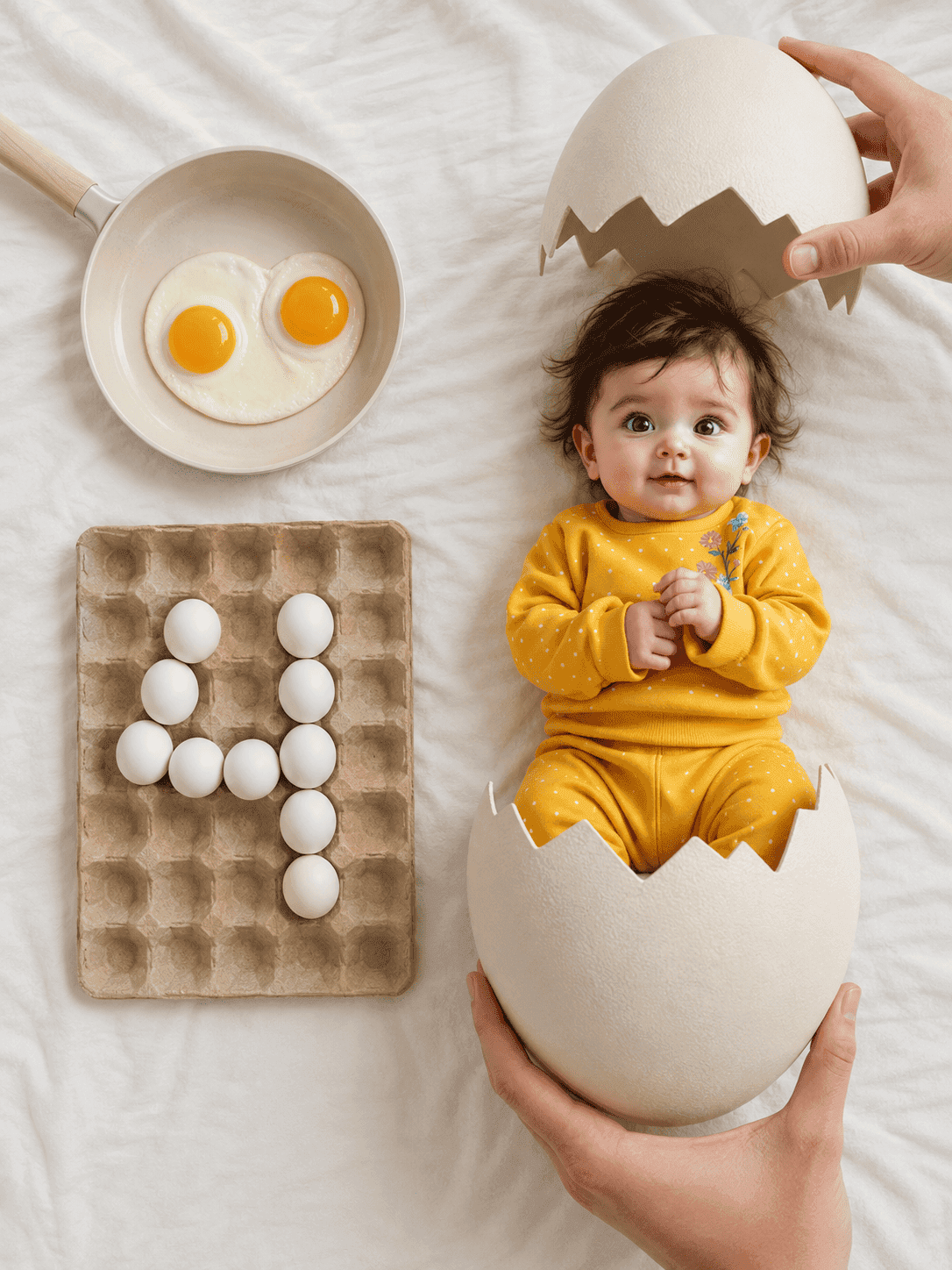
Hatching egg milestone flat lay
An overhead newborn flat lay where your baby has just hatched from a cracked egg, with the month number spelled out in eggs in a carton.
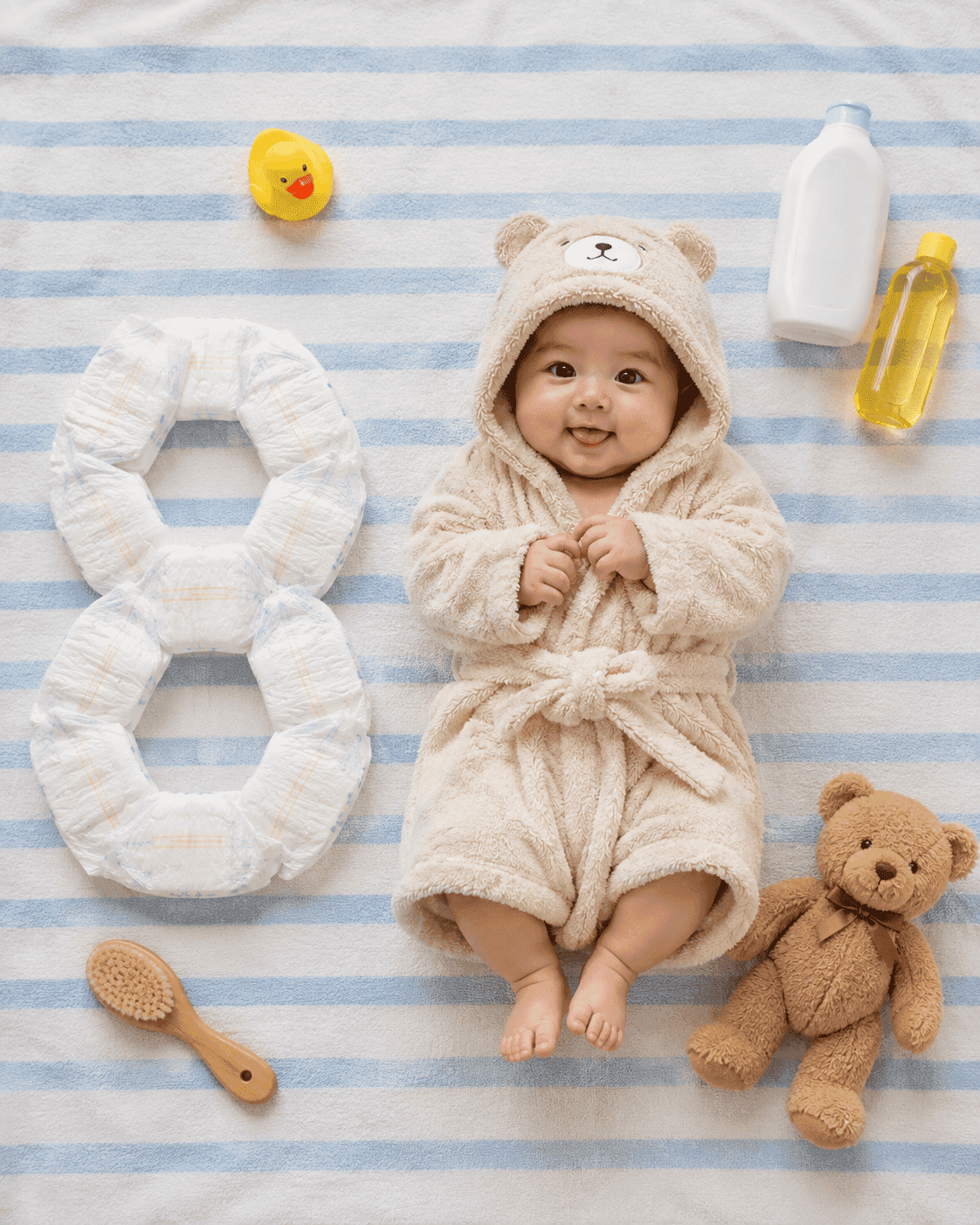
Bath essentials milestone flat lay
An overhead flat lay of your baby in a plush hooded bathrobe on a blue-and-white striped towel, with the month number built out of nappies beside them.